렌더링 · 성능
채팅 링크 썸네일 캐싱으로 로딩 59.5% 단축
채팅방에 링크를 붙이면 OG 썸네일이 떠야 "진짜 채팅"처럼 보인다. 감지·스크래핑·미리보기 구현까지는 금방이었는데, 진짜 일은 그 뒤에 따라온 스크롤 점프·깜빡임·중복 요청이었다.
배경: 링크가 문자열로 전송됐다
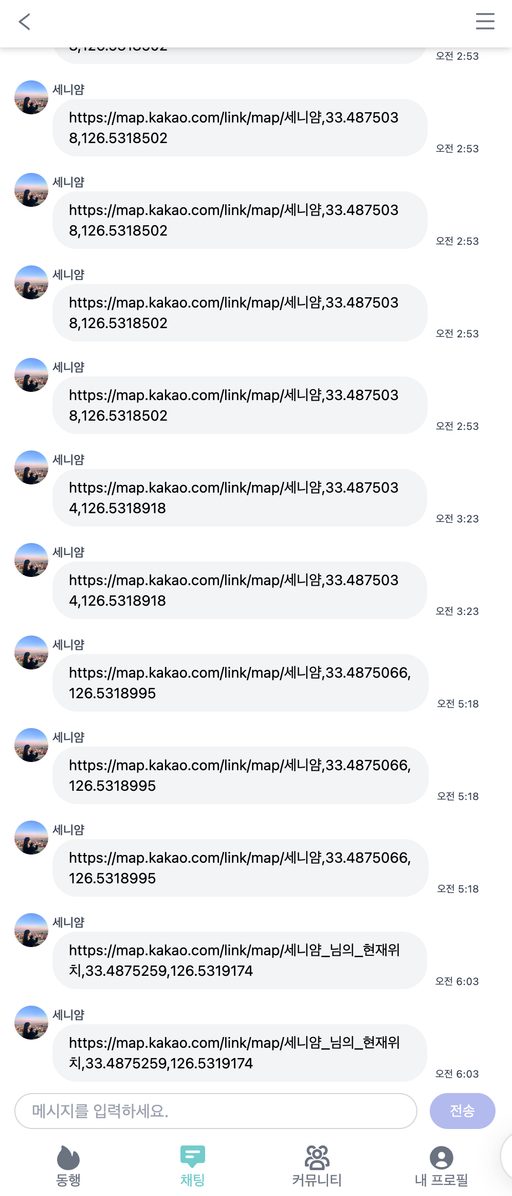
현재 위치를 채팅방에 보내면 카카오맵 링크가 문자열 그대로 전송됐다. 진짜 채팅처럼 보이려면 (1) 링크를 인식해 클릭 가능하게 하고, (2) 그 링크의 OG 태그를 읽어 썸네일을 보여줘야 했다.
구현: 감지 → 스크래핑 → 미리보기
1. 링크 감지 (linkify)
메시지에서 첫 URL을 정규식으로 찾는다.
// utils/linkify.ts
export const linkify = (text: string): string | null => {
  const urlPattern = /(https?:\/\/[^\s]+)/g;
  const match = text.match(urlPattern);
  return match ? match[0] : null;
};
2. 메타데이터 스크래핑 (cheerio)
감지한 URL의 HTML을 받아 cheerio로 OG 태그를 파싱한다.
// lib/scrapeMeta.ts
import { load } from "cheerio";

export const scrapeMeta = async (url: string) => {
  const html = await (await fetch(url)).text();
  const $ = load(html);
  return {
    title: $('meta[property="og:title"]').attr("content") || "No Title",
    description: $('meta[property="og:description"]').attr("content") || "",
    image: $('meta[property="og:image"]').attr("content") || null,
  };
};
3. API Route
클라이언트가 호출할 스크래핑 API를 Next.js Route로 제공한다.
// app/api/scrape/route.ts
export async function GET(request: NextRequest) {
  const url = new URL(request.url).searchParams.get("url");
  if (!url) return NextResponse.json({ error: "No URL" }, { status: 400 });
  return NextResponse.json(await scrapeMeta(url));
}
4. LinkPreview 컴포넌트
받아온 메타데이터로 썸네일·제목·설명을 출력하고, 로딩 중엔 스켈레톤을 보여준다.
// components/chat/LinkPreview.tsx
const LinkPreview = ({ url }: { url: string }) => {
  const [meta, setMeta] = useState<{ title?: string; description?: string; image?: string }>({});

  useEffect(() => {
    fetch(`/api/scrape?url=${encodeURIComponent(url)}`)
      .then((r) => r.json())
      .then(setMeta);
  }, [url]);

  return (
    <a href={url} target="_blank" rel="noopener noreferrer" className="block w-[270px] rounded-md border">
      {/* 썸네일 박스 크기 고정 (135px) */}
      <div className="flex h-[135px] w-full items-center justify-center overflow-hidden bg-gray-100">
        <img src={meta.image} alt={meta.title} className="h-auto w-full object-cover" />
      </div>
      <div className="flex h-[68px] flex-col p-3">
        {meta.title ? (
          <h4>{truncateText(meta.title, 25)}</h4>
        ) : (
          <div className="mb-2 h-4 w-3/4 animate-pulse rounded bg-gray-200" />
        )}
        {meta.description ? (
          <p className="text-sm text-gray-500">{truncateText(meta.description, 30)}</p>
        ) : (
          <div className="h-3 w-full animate-pulse rounded bg-gray-200" />
        )}
      </div>
    </a>
  );
};
문제: 느린 로딩 · 스크롤 점프 · 깜빡임
- 이미지를 매번 해당 사이트에서 불러와 로딩이 길었다.
- 썸네일이 늦게 들어오면 채팅창 길이가 변해, 맨 아래로 가던 스크롤이 중간에 멈췄다.
- 썸네일 박스가 작은 사각형이었다가 커지며 화면이 출렁였다.
해결: 박스 크기 고정 + 스켈레톤
처음엔 useState로 로딩 시점을 관리해 다 받을 때까지 스피너를 띄워봤지만, 채팅방 진입이 느려지고
코드 가독성도 나빠졌다.
핵심은 썸네일 박스의 가로·세로를 처음부터 고정하는 것이었다. 크기를 고정하니 로딩 전부터
스크롤이 맨 아래로 가고, 이미지가 늦게 들어와도 위치가 흔들리지 않았다. 빈 사각형이 정적인 문제는
Tailwind animate-pulse로 스켈레톤을 입혀 해결했다.
캐싱: 중복 스크래핑 제거
같은 링크(특히 카카오맵 실시간 위치)는 매번 OG를 다시 긁었다. 이중 캐싱으로 중복을 없앴다.
- 클라이언트(sessionStorage) - 같은 세션에서 같은 링크는 캐시 재사용
- 서버(메모리 캐싱) - 여러 사용자의 동일 링크는 한 번만 스크래핑
결과
- 썸네일 로딩 4s → 1.62s (59.5% 단축)
- 동일 URL 요청 최대 50회 → 1회 (메시지 50개·링크 50개 기준 실험)
- 박스 고정·스켈레톤으로 스크롤 점프·FOUC 제거
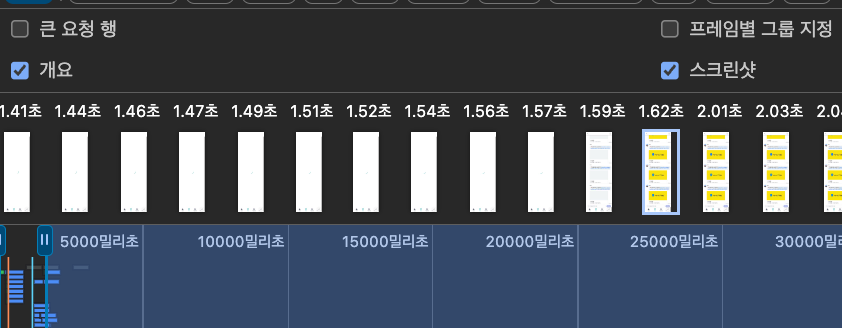
동일 링크 50개로 테스트했다면 개선률은 더 높게 나왔을 것.